
Do you hear that? That low, persistent hum coming from the corner of your office?
That’s your $4,000 workstation’s GPU fan screaming for mercy while it spends the next three hours calculating the exact bounce of a single light ray off a kitchen tap. We’ve all been there, staring at a progress bar, drinking way too much coffee, and praying that the client doesn’t call to ask for a "quick" change to the cabinet handles.
The central question on every designer's mind right now is simple: Can AI rendering actually replace traditional rendering engines?
The short answer is: it depends.
The longer (and much more exciting) answer is that for the KBB (Kitchen, Bedroom, and Bathroom) industry, the traditional "engine" isn't just under threat, it’s effectively being overtaken. The days of needing a local "render farm" just to show a client a different shade of navy blue are coming to an end.
The Traditional Engine: A Technical Masterpiece (That’s Too Slow)
We have to give credit where it's due. Traditional rendering engines like V-Ray, Corona, or Octane are incredible pieces of software. They are mathematically perfect. If you need to simulate the exact refractive index of a specific type of crystal glass under a specific Kelvin-rated bulb, they are your best friend.
However, that precision comes at a massive cost:
- Time: Even a "fast" traditional render can take 20 to 60 minutes per frame.
- Hardware: You need a powerhouse PC that doubles as a space heater.
- Complexity: You need a degree in "Slide-Rule-Ology" just to understand the light settings.
Basically, traditional rendering is a technical process. But design is a creative process. When you're in a meeting with a client who can't decide between "Sage Green" and "Olive Grove," the last thing you want to say is, "Great, I'll send you the new images tomorrow morning once the computer finishes thinking."
Enter the AI Era: Speed vs. Physics
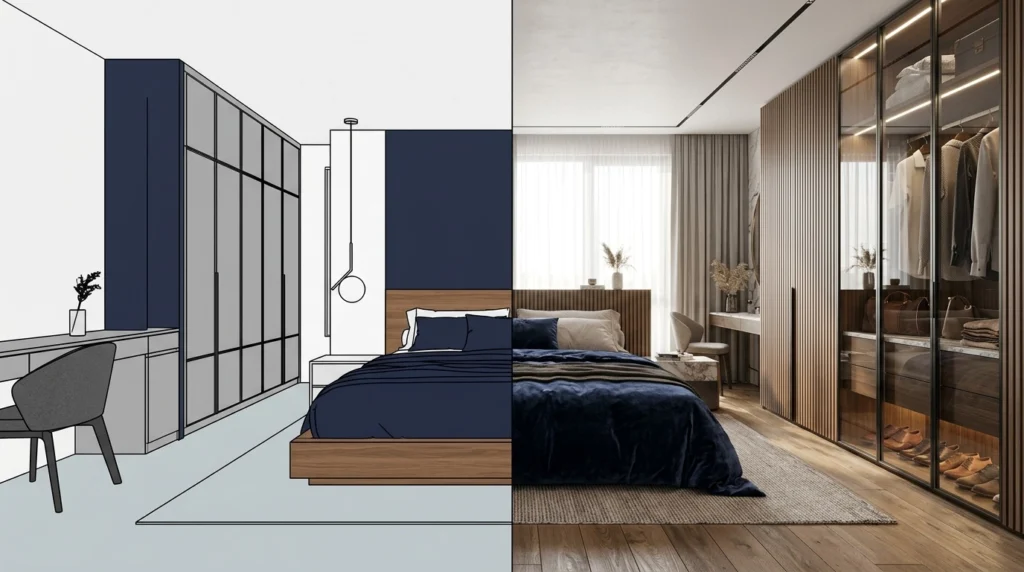
AI rendering doesn't try to calculate every single photon in the room. Instead, it "understands" what a high-end kitchen is supposed to look like. It has seen millions of professional architectural photographs, and it uses that knowledge to "paint" your scene in seconds rather than hours.
This is where the debate gets interesting. Critics used to say AI was "too random" for professional work. "What if it changes the layout?" they’d ask.
That was yesterday's problem. With advanced AI visualization, we’ve solved the "chaos" factor.

Stable Precision: The Control Freak’s Best Friend
At KBB Render, we introduced Stable Precision specifically to address the accuracy gap. This feature allows you to keep the exact geometry of your CAD export, the cabinets stay where you put them, the sink doesn't move, and the walls remain straight, while the AI handles the "heavy lifting" of textures, lighting, and realism.
It’s the best of both worlds: the structural integrity of a traditional engine with the lightning speed of AI.
Creative Realism: The Designer’s Secret Weapon
Sometimes, you don’t want a sterile, mathematically perfect image. You want feeling. You want the "wow" factor. Creative Realism is our mode for those moments. It adds that elusive "artistic flair", the way sunlight catches the dust motes or how a soft shadow pools under a kitchen island.
While traditional engines require you to spend hours manually "propping" a scene with digital clutter to make it look lived-in, AI does this instantly.
Comparing the Workflows
If you’re still on the fence about whether to ditch the old-school engines, let’s look at the cold, hard facts of the 2026 design landscape.
Typical Cost and Performance Structure
| Feature | Traditional Rendering | KBB Render (AI) |
|---|---|---|
| Render Time | 30 – 120 Minutes | 10 – 30 Seconds |
| Hardware Required | High-end GPU Workstation | Any Laptop (Cloud Based) |
| Learning Curve | Months to Master | 15 Minutes |
| Cost per Image | High (Time + Electricity) | Low (Included in Subscription) |
| Re-renders | Start from Scratch | Instant Adjustments |
Following the above, it's clear that AI isn't just a "fast alternative", it’s a completely different business model. It moves rendering from the "Production" phase of a project into the "Sales" phase.
The Features That Are Changing the Game
We aren’t just talking about making things "look pretty." We are talking about professional tools designed for the KBB industry.
1. Inspiration Transfer
Ever had a client point at a grainy Pinterest photo and say, "I want my kitchen to feel like that"?
In the old days, you’d spend hours trying to match the lighting and color grading. With Inspiration Transfer, you simply upload that reference image. The AI analyzes the style, lighting, and mood, and applies it directly to your 3D geometry.
2. Batch Rendering (6 Variations)
Why give the client one option when you can give them six? In one click, KBB Render can generate 6 different variations of a scene. Maybe one is "Scandinavian Minimalist," another is "Industrial Chic," and a third is "Traditional Country."
This allows you to explore the "what ifs" without any extra work.
3. Native 8K Upscaling
One of the biggest complaints about early AI was the resolution. Not anymore. Our Native 8K Upscaling ensures that your renders are crisp enough for high-end showroom displays, large-format print catalogs, and website hero images.

The Road Ahead: What’s "Coming Soon"?
If you think AI is impressive now, just wait until you see the roadmap. We aren't just replacing the "Still" render; we are coming for the "Flythrough."
- Still Render to Animation/Videos: Soon, you'll be able to take your 8K AI render and turn it into a cinematic flythrough. No more waiting 48 hours for a 10-second video clip.
- Add/Remove Objects: Imagine being able to "cleanup" a scene or swap out a toaster for a coffee machine with a single AI-powered brush stroke.
We are building a future where the software understands your intent, not just your mouse clicks.
Is the Engine Dead?
Bear in mind that there will always be a niche for traditional engines. High-end Hollywood VFX and hyper-technical architectural studies will likely stick to the old ways for a little longer.
But for the KBB professional? For the showroom owner who needs to close a sale today? For the designer who wants to spend more time designing and less time troubleshooting light leaks?
Yes. For the KBB industry, the traditional engine is effectively obsolete.
Basically, you have two choices. You can keep listening to your GPU fans roar while you wait for a single image, or you can embrace AI interior rendering and start delivering photorealistic results in the time it takes to pour a glass of water.
The "No-CAD-return" workflow is here. It’s faster, it’s cheaper, and, frankly: it’s a lot more fun.

Summarising…
Is AI rendering replacing traditional engines?
For 95% of interior visualization needs, the answer is a resounding yes.
- Speed: Seconds vs. Hours.
- Hardware: Cloud vs. Heavy Workstations.
- Quality: Photorealistic 8K results are now the standard.
- Workflow: Live edits in front of clients are now possible.
Stop waiting. Start rendering.
If you're ready to see what Stable Precision and Creative Realism can do for your business, it’s time to step into the future of KBB visualization.