
Can generic AI like Midjourney actually replace professional interior rendering tools?
It depends.
The short answer is yes: if you just want a pretty picture for a mood board. But if you need to actually build the kitchen or sell a specific wardrobe layout to a client?
The longer (and much more useful) answer is below.
The “Hallucination” Headache: Why Pretty Pictures Aren’t Enough
We have all seen those Midjourney renders.
They look incredible at first glance: moody lighting, perfect textures, and an overall “vibe” that feels straight out of a design magazine. But then you look closer. There is a chair with five legs, a cabinet that opens into a wall, and a sink that seems to be floating in mid-air.
This is what the industry calls “hallucinations.”
Generic AI models don’t understand architectural logic. They don’t know that a dishwasher needs to be 600mm wide or that a wardrobe door shouldn’t overlap with a ceiling beam.
Midjourney is an artist; KBB Render is an architect.
While Midjourney creates images from scratch based on a text prompt, KBB Render uses your actual design data to ensure that what you see is what can actually be built.
The CAD Connection: Real Workflows vs. Starting Over
Do you really want to spend hours writing the “perfect” prompt only to get a result that looks nothing like your floor plan?
Probably not.
The biggest frustration with using generic AI for interior design is the lack of workflow integration. If you are using professional software like SketchUp, Archicad, Winner, or Virtual Worlds, you have already done the hard work of setting the dimensions and layout.
- Midjourney: You upload a sketch, and it gives you a “reimagined” version that ignores your walls and window placements.
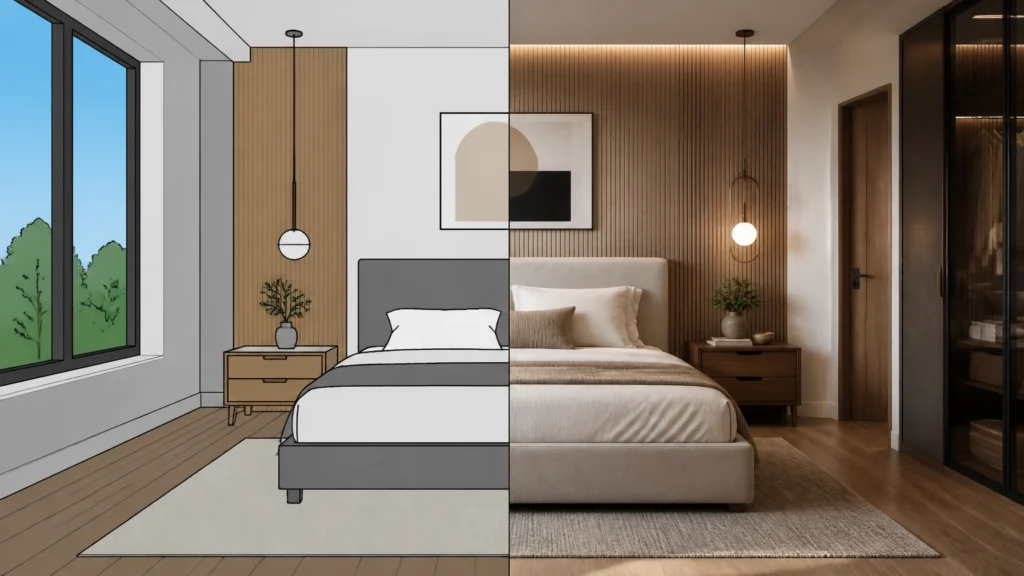
- KBB Render: You upload your base image or CAD export, and we preserve the geometry perfectly.
This means when you move a kitchen island in your CAD software, you can bring it into KBB Render and get a new, photorealistic result in seconds: without fighting a “prompt” to get the island back in the right spot.
Feature Showdown: Precision Meets Creativity

We designed KBB Render specifically for the kitchen, bedroom, and bathroom industry. We understand that you need more than just “AI magic”: you need control.
Following the above, here is how we handle the rendering process:
Stable Precision for Total Control
When your client has signed off on a specific layout, you cannot afford for the AI to “improvise.” Our Stable Precision feature ensures that every wall, cabinet, and appliance stays exactly where you put it. It turns your CAD wireframe into a photo without changing the design.
Creative Realism for Artistic Flair
Sometimes, you want the AI to suggest a better lighting setup or a more modern material finish. Creative Realism allows you to lean into the artistic side of AI, generating stunning atmospheric effects while still respecting the underlying structure of the room.
Inspiration Transfer
Found a stunning photo on Pinterest or Instagram? You can use Inspiration Transfer to apply that specific style, color palette, or lighting mood to your own design. It’s like a stylist in a box: without the risk of the AI “hallucinating” new furniture into the scene.
Speed and Scalability: The Batch Advantage

In a high-pressure showroom environment, time is literally money.
If you use Midjourney, you are often stuck in an “upscale and vary” loop, waiting minutes for each iteration. We do things differently.
- Batch Rendering (6 variations): Generate 6 different lighting or material variations in a single click.
- Native 8K Upscaling: Most generic AI tools struggle with high resolution. Our native upscaler is built for large-scale showroom displays and high-end print marketing.
- Instant Material Edits: Want to see that wardrobe in Oak instead of Walnut? You can swap materials instantly without re-rendering the whole scene.
The Comparison: At a Glance
| Feature | Midjourney | KBB Render |
|---|---|---|
| Geometric Accuracy | Low (Hallucinates) | High (Stable Precision) |
| CAD Integration | None | Native Exports |
| Industry Focus | Generic Art | Kitchen, Bedroom, Bath |
| Resolution | Variable | Native 8K |
| Workflow Speed | Slow Iteration | Batch Rendering |
Why Precision Wins in the Showroom

Imagine a client sitting in your showroom.
They love the layout you’ve designed in Winner or SketchUp, but they can’t quite “see” it. If you show them a Midjourney render that has the wrong number of cabinets or a different window layout, you’ve just created a communication gap.
You are now selling a dream that doesn’t exist.
By using KBB Render, you are showing them their kitchen. The exact layout, the exact materials, and the exact light from their actual windows. This level of clarity is what closes deals and prevents “buyers’ remorse” later in the project.
Coming Soon: The Next Level of Visualization
We aren’t stopping at static images. We understand that the future of design is moving toward immersive experiences.
Bear in mind that our roadmap includes:
- Still render to animation/videos: Transform your 8K renders into cinematic fly-throughs for social media and presentations.

Summarising…
Is Midjourney a fun tool for brainstorming? Yes.
Is it a professional tool for KBB designers and architects? No.
For those who need to balance creativity with technical accuracy, the choice is clear. You need a tool that speaks the language of CAD and the language of photorealism simultaneously.
KBB Render provides the precision your business needs to sell faster and design better.
Ready to see your designs in 8K? Try KBB Render today.