
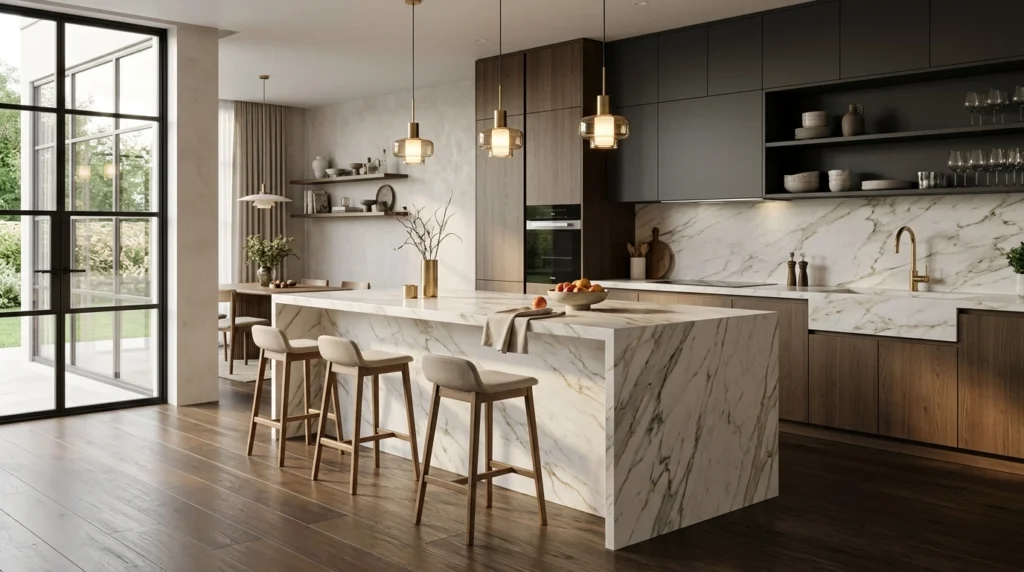
We’ve all been there. You’re in a design meeting, the energy is high, and the client says: “I love the layout, but can we see what it looks like with dark navy cabinets and a brass faucet instead of the chrome?”
Is it possible to show that change in a high-end render right now, while the client is still sitting in front of you?
Actually, yes, but only if you’ve moved past the traditional rendering “waiting game.”
The longer (and more useful) answer is below. Basically, the industry is shifting from a “let me email you next week” workflow to a “let’s decide this right now” sales process. If you are still spending 4 hours re-rendering a scene because a client changed their mind about a backsplash, you aren’t just losing time- you’re losing momentum.
Why the “I’ll Email You Later” Workflow is Killing Your Sales
Traditionally, the rendering process was a massive bottleneck. You’d spend hours in CAD (SketchUp, Archicad, or Winner), set up your lights, hit ‘render,’ and wait. If the client wanted a change, you had to go all the way back to the start.
This created a “friction gap.” By the time you emailed the new renders three days later, the client’s excitement had cooled. They had time to second-guess the budget. They started looking at other designers on Instagram.
The goal for 2026 is simple: Close the gap.
When you use KBB Render, you aren’t just “making a picture.” You are using a live sales tool. Because our platform allows you to edit materials, textures, and even add furniture directly on the render, you don’t have to go back to your CAD software for every minor tweak.
This is what we call the ‘No-CAD-return’ workflow.
The Fear: “Will the AI Just Make Things Up?”
The biggest hesitation designers have about “live” AI rendering is the fear of hallucinations. We’ve all seen AI images where the cabinets have five handles or the fridge is built into the ceiling.
Can you trust AI in a professional setting?
Yes, if you use the right engine. This is why we developed Stable Precision.
- Stable Precision ensures that the geometry you exported from your CAD software stays exactly as you designed it.
- The walls don’t move.
- The cabinet dimensions stay true.
- The window stays where the architect put it.
By using Stable Precision during a live meeting, you get the speed of AI with the structural integrity of a traditional render. You can swap a marble countertop for a quartz one in seconds, and the client sees a realistic representation, not a “randomly generated” room.

How to Run a “Live Edit” Session with a Client
Following the above, here is how a 2026 design meeting actually looks with KBB Render:
- Start with the Base: You upload your base image or CAD export (SketchUp, Archicad, etc.) before the meeting.
- The “Inspiration Transfer” Trick: The client pulls up a photo on Pinterest and says, “I want the vibe of this Soho loft.” You use Inspiration Transfer to apply that lighting and material “feel” to your specific layout instantly.
- Real-Time Material Swapping: Use the edit features to change the flooring from light oak to dark walnut.
- Batch Rendering (6 Variations): With one click, generate 6 different versions of the scene. Show them the kitchen in “Morning Sun,” “Evening Ambient,” and “Minimalist White” all at once.
- Upscale to 8K: Once they say, “That’s the one!” you hit Native 8K Upscaling. By the time they’ve finished their coffee, you’re handing them a print-ready, photorealistic file.
| Feature | Traditional Rendering | KBB Render (AI) |
|---|---|---|
| Change Material | Go back to CAD (30-60 mins) | Instant (Seconds) |
| Render Time | 20 mins to 1 hours | 15 – 30 Seconds |
| Client Revisions | Days of back-and-forth | Done live in meeting |
| Hardware Needed | $4k+ Desktop Workstation | Any Laptop (Cloud-based) |
Using “Inspiration Transfer” to Match a Mood Board
One of the hardest parts of being a designer is translating a client’s “feeling” into a technical design. They show you a mood board that is moody, dark, and industrial, but your current render is bright and airy.
How do you bridge the gap without starting over?
You use Inspiration Transfer. This feature allows you to take a reference image (the “vibe”) and apply its stylistic DNA to your existing geometry.
- It keeps your kitchen layout.
- It applies the lighting, color grading, and material “warmth” from the reference.
- It happens in seconds.
This is a game-changer for live meetings. Instead of trying to explain how a different lighting setup would look, you just show it. It turns you from a “technical operator” into a creative partner.

Closing Deals Faster: The Psychology of “Playing”
There is a psychological shift that happens when a client is allowed to “play” with the design. When you let them choose between three different tile patterns and they see the result instantly in Creative Realism, they stop being a “critic” and start being a “creator.”
Why does this help you close?
- Ownership: They feel like they built the space with you.
- Confidence: They don’t have to “imagine” what the dark cabinets will look like: they know.
- Speed: You can sign the contract at the end of the first meeting because the visual uncertainty is gone.
Basically, you are removing every “I need to think about it” excuse that usually stalls a project.
Coming Soon: The Next Level of Live Design
While KBB Render is already the fastest way to generate high-quality visualizations, we aren’t stopping there.
Bear in mind that the “live meeting” experience is about to get even more immersive. On our 2026 roadmap, we are introducing:
- Still Render to Animation: Imagine finishing a render and then, with one click, showing the client a cinematic fly-through of the kitchen they just designed.
These tools are designed to keep the client’s attention exactly where it belongs: on your design.

Summarising…
Can you really show AI renders to clients during a live meeting?
Yes. But you have to move away from the mindset that “rendering” is a separate, post-design phase. In 2026, rendering is the design phase.
By using tools like Stable Precision to keep your geometry safe and Batch Rendering to show options instantly, you transform from a designer who delivers “outputs” into a consultant who delivers “experiences.”
Key Takeaways:
- Stop the back-and-forth by adopting a ‘No-CAD-return’ workflow.
- Use Inspiration Transfer to match client mood boards on the fly.
- Leverage Native 8K Upscaling to provide professional results before the meeting ends.
- Close deals faster by making the client part of the live visualization process.
The era of waiting hours for a single image is over. It’s time to start designing at the speed of conversation.