
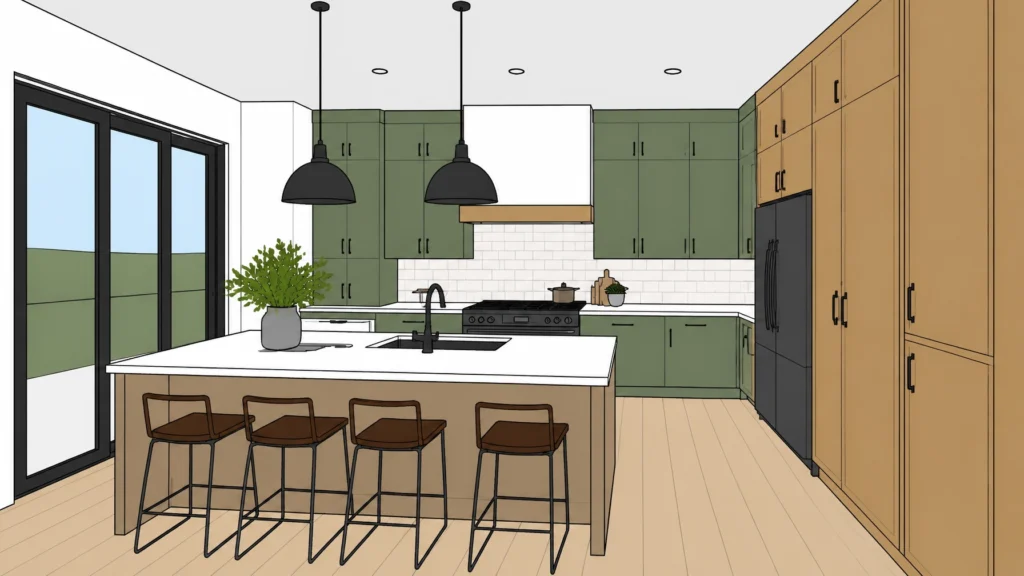
Are you tired of spending hours building the perfect SketchUp model, only to realize it still looks like a “drawing” when you show it to your client?
The real question is: Why should you spend hours setting up lights and materials when AI can do it in 60 seconds?
The short answer? You shouldn’t.
If you’ve ever felt the frustration of a client squinting at a “flat” SketchUp export, trying to imagine what the actual kitchen will look like, you’re not alone. The longer (and much more profitable) answer is below.
The Gap Between SketchUp and “Wow”
We love SketchUp. It’s fast, intuitive, and perfect for getting geometry right. But let’s be honest – its native output isn’t exactly “luxury showroom” quality.
Traditionally, if you wanted to bridge that gap, you had two choices:
- Spend hours learning complex plugins like V-Ray or Enscape.
- Spend thousands on a high-end PC that can handle the processing.
Most designers we talk to at KBB Render just want to design. They don’t want to become “render technicians.” They want to show a client a stunning, photorealistic image that closes the deal.
Basically, you need a bridge between your raw geometry and a professional visual. That’s where AI rendering comes in.
The Solution: Why AI is Changing the Game
AI rendering isn’t just about making things look “pretty.” It’s about speed and communication. By using AI-powered tools, you can take a basic screenshot of your SketchUp scene and transform it into a high-end visual instantly.

This allows you to:
- Experiment faster: Try 10 different styles in the time it takes to brew a coffee.
- Communicate clearly: Show exactly how a specific marble countertop will reflect light.
- Save money: No more expensive hardware or monthly subscriptions for heavy render engines.
How to Turn a SketchUp Model into an 8K Render
Getting from a “flat” model to a “wow” render is easier than you think. You don’t need a degree in lighting to get professional results.
Following the steps below, you can upgrade your workflow today:
- Upload Your Design: Export your view from SketchUp or any CAD software (JPG/PNG) and upload it to KBB Render.
- Select the Rendering Engine: Choose between Stable Precision (to keep geometry unchanged) or Creative Realism. You can also choose the Inspiration Transfer or Edit Tool.
- Generate & Download: Get your high-resolution 4K render or upscale to 8K.
- Edit & Style: Use the Edit Tool to style materials, colors, and furniture after rendering without returning to CAD software.
Pro Features That Make the Difference
Not all AI is created equal. While generic AI tools often “hallucinate” (like adding a third leg to a chair), KBB Render is built specifically for the kitchen, bedroom, and bathroom industry.
Stable Precision
This is the game-changer. Most AI tools tend to move walls or change the shape of your cabinets. Stable Precision ensures that your SketchUp geometry stays exactly as you designed it. If you drew a 900mm cabinet, it stays a 900mm cabinet.
Creative Realism
Sometimes you want the AI to take the lead on styling. This feature adds that “interior designer’s touch,” suggesting decor, plants, and atmospheric lighting that makes a space feel lived-in and luxury.
Batch Rendering (6 variations at once)
Why settle for one lighting option? With one click, you can generate 6 different variations of your scene. Show your client how their kitchen looks in bright morning sun, moody evening light, or a cozy overcast afternoon.
Traditional Rendering vs. AI Rendering
When deciding which route to take for your next project, consider this comparison:
| Feature | Traditional Rendering (V-Ray/Enscape) | KBB Render (AI) |
|---|---|---|
| Setup Time | 30 min – 2 Hours | 30 Seconds |
| Hardware | High-end GPU required | Runs in browser |
| Learning Curve | Steep / Technical | Zero / Intuitive |
| Image Quality | Photorealistic | Photorealistic |
| Flexibility | Rigid | Instant Variations |
Basically, traditional rendering is for when you have all the time in the world. AI rendering is for when you have a business to run and clients to impress.
The Future: What’s Coming Soon
We aren’t stopping at static images. The KBB Render roadmap is packed with features designed to make your design process even smoother.
- Still Render to Animation/Videos: Soon, you’ll be able to turn your static AI renders into cinematic fly-throughs.
Summarising…
Can you really get photorealistic visuals from SketchUp in seconds?
Yes. By moving away from the “technical” side of rendering and embracing AI, you free yourself up to do what you do best: designing beautiful spaces.
Bear in mind that your clients aren’t buying a “render” – they are buying a dream. KBB Render helps you sell that dream faster and more effectively than ever before.